From Message Pump to Multitouch: Windows CE, PocketJS, and the Meizu M8
A PocketJS port becomes an excavation of the Windows CE programming model: message pumps, HWNDs and GDI versus reactive state and declarative UI—and the shell, caches, interaction design and stubborn engineering that made the Meizu M8 feel like an iPhone.
Written by Yifeng "Evan" Wang
On the Meizu M8, MessageBoxW is a trapdoor.
Call it from an otherwise polished full-screen application and the illusion opens: a blue Windows title bar, a tiny system font, a desktop-sized information icon, and one little grey button. Beneath Meizu's touch interface was Windows CE 6, still thinking in windows, handles, messages, and device contexts.
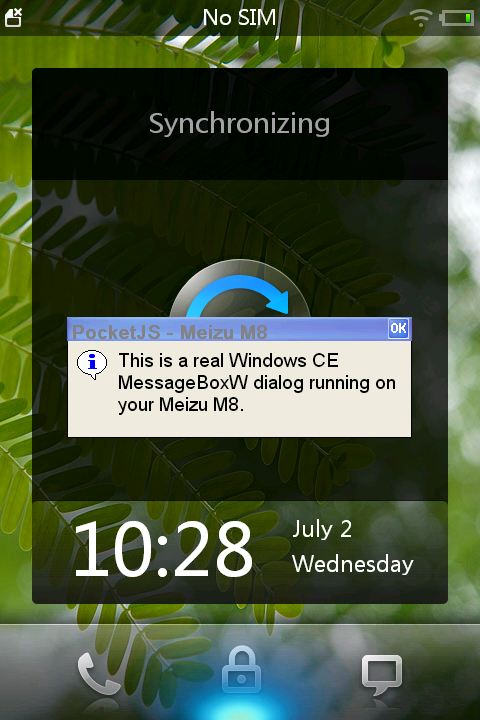
A real MessageBoxW on the M8, captured through the phone's own GDI path during the PocketJS port. No new device capture was made for this post.
This screenshot changed the question I wanted the port to answer. Getting PocketJS onto the phone was useful, but the interesting part was no longer how to persuade a 2026 Mac to build and deploy a Windows CE executable. It was this:
What does a modern component UI look like when it lands on an operating system whose native unit of thought is a message? And how did Meizu make that operating system feel, at least from the outside, so much like the first iPhone?
The answer is not that Windows CE was secretly modern. It is that Meizu built a new phone experience over an older, lower-level programming model, then fought the hardware until the disguise held. Porting PocketJS let us repeat a small version of the same exercise and see every seam.
A window is an address for messages
Windows CE inherited the shape of Win32, but it was not desktop Windows squeezed into a phone. It was a configurable embedded operating system. An OEM selected the kernel components, drivers, graphics and windowing system, shell, synchronization stack, and APIs that a particular device would ship. Microsoft's own documentation repeatedly warns that an API in the complete CE package might still be absent from an OEM image.
When the graphical subsystem is present, the application model is recognizable. A native executable enters through WinMain. It registers a window class containing a callback, creates an HWND, then runs a loop that removes messages from the thread's queue and dispatches them to that callback.
static LRESULT CALLBACK WindowProc(
    HWND hwnd, UINT message, WPARAM wparam, LPARAM lparam
) {
    switch (message) {
        case WM_TIMER:       run_one_frame(hwnd); return 0;
        case WM_PAINT:       paint_pixels(hwnd);  return 0;
        case WM_LBUTTONDOWN: touch_down(lparam);  return 0;
        case WM_LBUTTONUP:   touch_up(lparam);    return 0;
        case WM_KEYDOWN:
            if (wparam == VK_HOME || wparam == VK_ESCAPE)
                PostMessage(hwnd, WM_CLOSE, 0, 0);
            return 0;
        case WM_DESTROY:     PostQuitMessage(0);  return 0;
    }
    return DefWindowProc(hwnd, message, wparam, lparam);
}

int WINAPI WinMain(HINSTANCE app, HINSTANCE previous,
                   LPWSTR command_line, int show) {
    RegisterClass(&window_class);
    HWND hwnd = CreateWindow(/* class, title, style, position ... */);
    SetTimer(hwnd, 1, 17, NULL);

    MSG message;
    while (GetMessage(&message, NULL, 0, 0)) {
        TranslateMessage(&message);
        DispatchMessage(&message);
    }
    return (int)message.wParam;
}
An HWND is a handle, not the window itself. The application passes that opaque value back to the operating system whenever it wants to show, move, invalidate, focus, close, or otherwise address the window. The window procedure is where the other direction arrives: touch, keys, timers, paint requests, focus changes, commands from child controls, and requests to close.
The phrase message pump is literal. GetMessage waits when the queue is empty. DispatchMessage looks at the destination HWND and calls its registered window procedure. A WM_TIMER is not permission to run forever on a special timer thread; it is another item competing for the same UI thread. A five-second callback means five seconds without paint, touch, Home, or close handling.
Painting is a protocol too. The application invalidates a region. Windows eventually delivers WM_PAINT. BeginPaint lends the callback an HDC clipped to that damaged region, drawing commands write through it, and EndPaint marks the region handled. Forget to validate the region and the system keeps asking.
The native dialog in the opening screenshot hides all of this. MessageBoxW creates native controls, disables its owner, and remains inside a modal operation until the button is pressed. A declarative-looking line of C is concealing a second event-processing scope. That is convenient, but nested modality also makes ordering and re-entrancy harder to reason about.
None of this was primitive in the sense of being thoughtless. Handles kept ABI boundaries small. An ordered thread queue made interaction deterministic. Invalid-region painting avoided redrawing an entire low-power screen. OEM configurability let the same kernel family serve a scanner, a car computer, a PDA, or a phone. Windows CE 6 even replaced the old 32-process and 32 MB per-process ceilings with a substantially larger kernel model. The GUI contract, however, remained the Windows contract: the operating system reports what happened; application code must decide what to mutate and what to redraw.
The modern mental model reverses ownership
The event loop did not disappear from modern GUI systems. iOS, Android, browsers, SwiftUI, React, Compose, and Solid all still require a responsive main thread somewhere underneath. What changed is the level at which most application authors work.
In a classic Win32-style program, the callback receives an event and performs the updates:
case WM_COMMAND:
    if (LOWORD(wparam) == ID_PLAY) {
        playing = !playing;
        SetWindowText(play_button, playing ? L"Pause" : L"Play");
        EnableWindow(stop_button, playing);
        InvalidateRect(progress_window, NULL, FALSE);
    }
    return 0;
The Boolean, the button label, the enabled state, and the invalid region are four pieces of state that the programmer must keep synchronized.
In PocketJS with Solid, the application changes one value and describes the UI that depends on it:
import { Button, Text, View } from "@pocketjs/framework/components";
import { createSignal } from "solid-js";

const [playing, setPlaying] = createSignal(false);

<View>
  <Button onPress={() => setPlaying(value => !value)}>
    <Text>{playing() ? "Pause" : "Play"}</Text>
  </Button>
  <Button disabled={!playing()}>Stop</Button>
</View>
Solid tracks which computations read playing(). PocketJS owns the retained UI tree, layout, hit testing, invalidation, animation, and rasterization. The app does not locate a button handle and push a new string into it. It updates the source of truth; the framework makes the rendered tree agree.
This reversal changes the everyday failure mode.
With the message model, it is easy for the visible interface to become a stale copy of the program's state. One branch updates the label but forgets the enabled state. One early return leaks a brush or device context. A resize handler recomputes three rectangles but misses a fourth. A modal dialog runs messages at a point the caller assumed was synchronous.
With a declarative framework, it is easier to make the state graph itself confusing: duplicate sources of truth, effects that feed back into signals, unstable component identity, or expensive recomputation. Modern frameworks do not abolish complexity. They move the central question from “Which objects must I mutate after this message?” to “What UI follows from this state?”
That shift is especially important on a phone. A desktop-era API can report a finger as WM_LBUTTONDOWN, but calling touch a mouse does not provide finger-sized controls, gesture arbitration, kinetic scrolling, density-aware layout, orientation handling, animation, or a coherent Back/Home contract. Those policies must exist somewhere above the message.
What felt old and inconvenient
Windows CE's programming model was coherent, but by modern GUI standards it made application developers carry a great deal of mechanism:
- A message is only a number plus two machine words. The meaning of
wParamandlParamchanges for every message. Coordinates may be packed into bits; child-control notifications shareWM_COMMAND; ownership is documented rather than expressed by types. - State is distributed. Some lives in application structs, some inside native controls, some in window properties, some in the registry, and some only in the pixels last painted. The OS does not derive one from another.
- Layout is not a default service. Dialog resources and coordinates work for known screens. A 480×720, 255-ppi finger interface exposes every assumption made for a stylus PDA or desktop monitor.
- Painting is manual and immediate. GDI gives useful clipping and device independence, but the application still decides what must be redrawn, selects resources into a device context, and restores or deletes them correctly.
- Lifetime is procedural.
CreateWindowmust eventually meetDestroyWindow;GetDCmust meetReleaseDC; selected GDI objects have rules about when they can be deleted. The compiler cannot prove most pairings. - Responsiveness is a convention. The message pump gives clean serialization only while callbacks return quickly. Long work freezes the entire UI, while adding threads introduces synchronization around state that was previously single-threaded.
- The platform is whatever the OEM shipped. Windows CE was a kit for device makers. That flexibility was excellent for embedded products and awkward for third-party applications expecting one stable phone platform.
The last point explains an apparent contradiction. Windows CE made it relatively easy to get a Windows program running on the M8. It did not make that program feel like an M8 application. Contemporary users noticed the gap: raw Windows CE software could run, yet its tiny controls and stylus assumptions looked alien beside Meizu's software.
Our first PocketJS frames found the same gap in a different form.
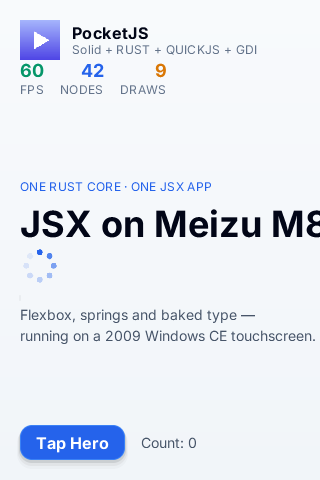
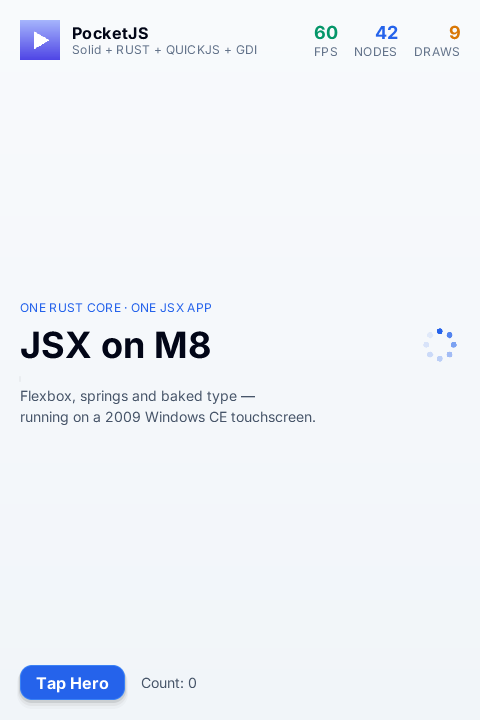
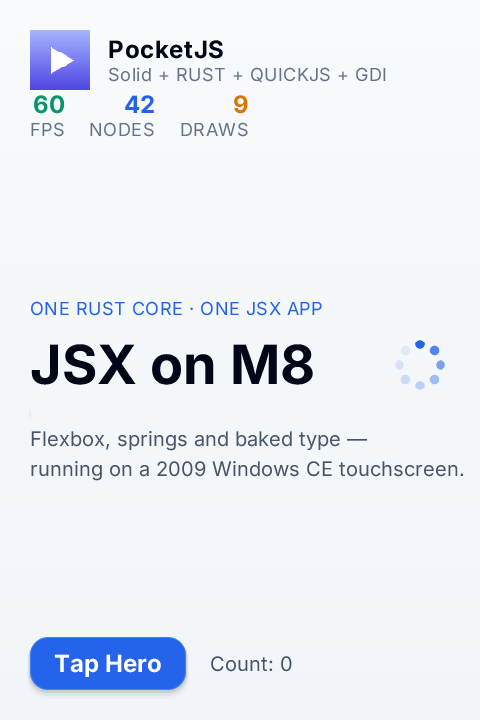
All three are device artifacts from the original porting session, not browser mockups. The sequence is a compact lesson in GUI models: an API can tell you the screen's coordinates and still know nothing about the human hand holding it.
PocketJS as a translator between the two models
PocketJS does not replace Windows CE's event loop. It sits inside it.
The M8 host still creates an HWND, receives WM_LBUTTONDOWN, returns from WindowProc, and paints through GDI. But those mechanisms stop at a narrow boundary. The host turns messages into device-neutral frame input and hands the guest one 60 Hz tick. In the other direction, PocketJS returns one complete 480×720 BGRA framebuffer, and the host presents it with SetDIBitsToDevice.
This made Windows CE an unusually clear test of PocketJS's boundary. The operating system is responsible for time, physical input, process exit, a shell entry, and the final pixel copy. Solid and the app never learn HWND, WM_PAINT, GDI, or Meizu registry keys. Conversely, the host never learns what a button or component means.
The port did uncover two places where translating events into state is not mechanical. The M8's vertical coordinate reaches 719, beyond the 511 maximum of PocketJS's older packed touch word, so the host contract needed wider coordinates. A quick down-and-up can also occur between two 60 Hz guest samples, so the host must latch the press until one frame observes it. Windows CE delivered both messages correctly; the bug existed in the difference between an event stream and a sampled state.
That is the deeper continuity between 1990s Win32 and modern reactive UI. Both need events and state. They disagree about which one application code should organize itself around.
How Meizu made Windows CE look like an iPhone
The easy answer is “by copying the iPhone.” Contemporary reviewers called the resemblance obvious, sometimes mercilessly so. The icon grid, glossy surfaces, touch gestures, photo browsing, inertial movement, and full-screen transitions all arrived in the wake of Apple's 2007 device. Pretending otherwise would make the history less honest.
But resemblance describes the target, not the work.
Meizu did not license Windows Mobile and reskin a finished phone shell. It licensed Windows CE as an embedded foundation and built its own system, usually called Mymobile or Mmobile, above it. In a later oral history, M8 engineer Zhu Guozhi recalled responsibility for power-on and power-off, the desktop, lock screen, notification bar, and surrounding frameworks. The team replaced the stock shell, removed desktop-like buttons and operations, and constructed touch-oriented behavior of its own.
The visual work was equally physical. EICO took over much of the interaction and interface design. Designer accounts describe a scope stretching from interaction and visuals to packaging and launch material. The engineering oral history remembers an earlier period with too few working prototypes: interface sheets were printed, cut out, and glued onto hardware models so they could be judged at phone scale. More than a thousand paper screens were reportedly used.
The finished graphics still had to survive the M8 display path. Engineers described visible banding in gradients on its 16-bit output and used dithering in the assets to hide it. That is a small detail with a large implication: the glassy, continuous surfaces associated with the iPhone era were not native properties of the platform. They were premeditated illusions encoded into pixels.
Then the pixels had to move.
The M8's GPU was not carrying the shell to an iPhone-like result. Zhu recalled early desktop scrolling around 10–20 FPS. Caching images raised part of that range to roughly 17–18 FPS. The team then discovered that Windows CE text rendering was also consuming a large share of the frame and added a text cache, finally clearing the 24 FPS line they considered acceptable.
This is where “they copied the iPhone” stops being a sufficient technical explanation. A screenshot can be copied by a designer. A responsive shell requires input dispatch, animation timing, resource lifetime, caching, font rendering, application conventions, recovery behavior, and thousands of small decisions that hold together outside the screenshot.
There were limits. The opening MessageBoxW still has tiny controls because native Win32 compatibility remained underneath. Third-party software that used raw CE controls could look like a stylus application accidentally enlarged onto a high-density phone. The new experience was strongest where Meizu owned the whole path: shell, bundled applications, custom libraries, assets, and interaction.
What our small port learned from their large one
PocketJS took the opposite route from Meizu. Meizu turned Windows CE into a whole phone platform. We brought a self-contained modern UI runtime and asked Windows CE for the smallest possible hosting surface.
That difference explains why the PocketJS host can stay narrow, but the same hardware still taught us some of the same lessons:
- Native resolution is not the same as usable scale.
- A pointer message is not yet a reliable touch interaction.
- A full-screen window is not entitled to outrank the shell; our first topmost window trapped the Home experience until the host stopped claiming system-topmost status.
- A program is not integrated because its executable launches. It needs an identity in
MiniOneShell, a correct icon, an exit path, and behavior that returns the device to its owner. - Compatibility APIs preserve old assumptions along with old software. The closer an app stays to those defaults, the more the old desktop leaks through.
Even the icon became a miniature version of that last point. Meizu's shell cached icon paths aggressively enough that replacing the file bytes could leave the old picture visible. The deployment flow had to install the corrected art at a build-qualified path and update the registry entry.


For the record, the original session accepted build, deployment, launch, native 480×720 output, touch, Home/Escape exit, and shell registration on one physical M8/M8SE. The final post-review tree was rebuilt and passed all eleven host/build validation stages, but that last binary was not redeployed after the phone stopped enumerating over USB. The screenshots here belong to the earlier device-proven builds and dialog capture. The phone is not connected now, and this rewrite did not manufacture a fresh hardware result.
That evidence boundary matters because nostalgia is already generous enough. We do not need to make the machine more successful than it was to respect what its engineers achieved.
A salute through the trapdoor
The Meizu M8 was derivative. It was also audacious.
In 2007, a comparatively small Chinese music-player company chose an embedded Windows kernel, negotiated for the pieces it could get, wrote the phone system it did not receive, and tried to meet the interaction standard the first iPhone had just made visible. The team rebuilt a shell that Windows CE never promised them. Designers evaluated printed interfaces on glued-up models. Engineers dithered gradients because the display path showed bands, cached images because scrolling was too slow, then cached text because the first cache was not enough.
They worked in the uncomfortable middle between two eras. Underneath were HWND, WM_PAINT, GDI, a registry, and OEM-selected components. Above them was a new public expectation: direct manipulation, continuous motion, finger-sized geometry, a coherent full-screen product, and no sight of the computer underneath.
The M8 did not erase Windows CE. The native dialog proves that. What the team accomplished was more difficult and more interesting: they built a convincing modern interaction model on top of a system that offered mechanisms, not that model.
Porting PocketJS let us look down through the same trapdoor. We arrived with reactive state, components, flex layout, hit testing, and a retained renderer; Windows CE offered a queue, a callback, a timer, an HDC, and a place to put 345,600 finished pixels. The two systems could coexist because the boundary between them was made explicit.
To Zhu Guozhi and the engineers who rebuilt the shell; to the people who chased every frame through image and text caches; to EICO and the designers who turned paper, 16-bit color, and borrowed visual language into a coherent object; and to everyone who kept going while the hardware, tools, and schedule argued back: the PocketJS port was tiny beside what you did, but it made the scale of your work legible.
Respect.
Further reading: Microsoft's documentation on messages and message queues, the Windows CE DispatchMessage and BeginPaint contracts, and the Windows Embedded CE 6 kernel changes document the platform model. The M8 history and performance recollections come from interviews with the original team; EICO's contribution is also preserved in a designer's M8 portfolio and contemporary coverage. Apple's description of declarative view hierarchies and Android's Compose mental model provide modern points of comparison. PocketJS's M8 host is documented in docs/MEIZU_M8.md, and the port landed in PR #279.