A Square Screen and a Dead Signing Server: PocketJS on the BlackBerry Classic
A 2014 square-screen BlackBerry, and the only thing standing between it and a freshly written frame: signing servers that went dark in January 2022. The port itself is one 547-line BB10 Core Native host over libscreen, EGL and GLES2. Around it: QNX's microkernel, where even the compositor is a user-space service; the community root project that reopened the door; a phone that appears on your desk as a network host, managed over HTTPS+CGI+XML and mounted over SMB; and an optical trackpad treated as just another relative axis.
Written by HalfSweet
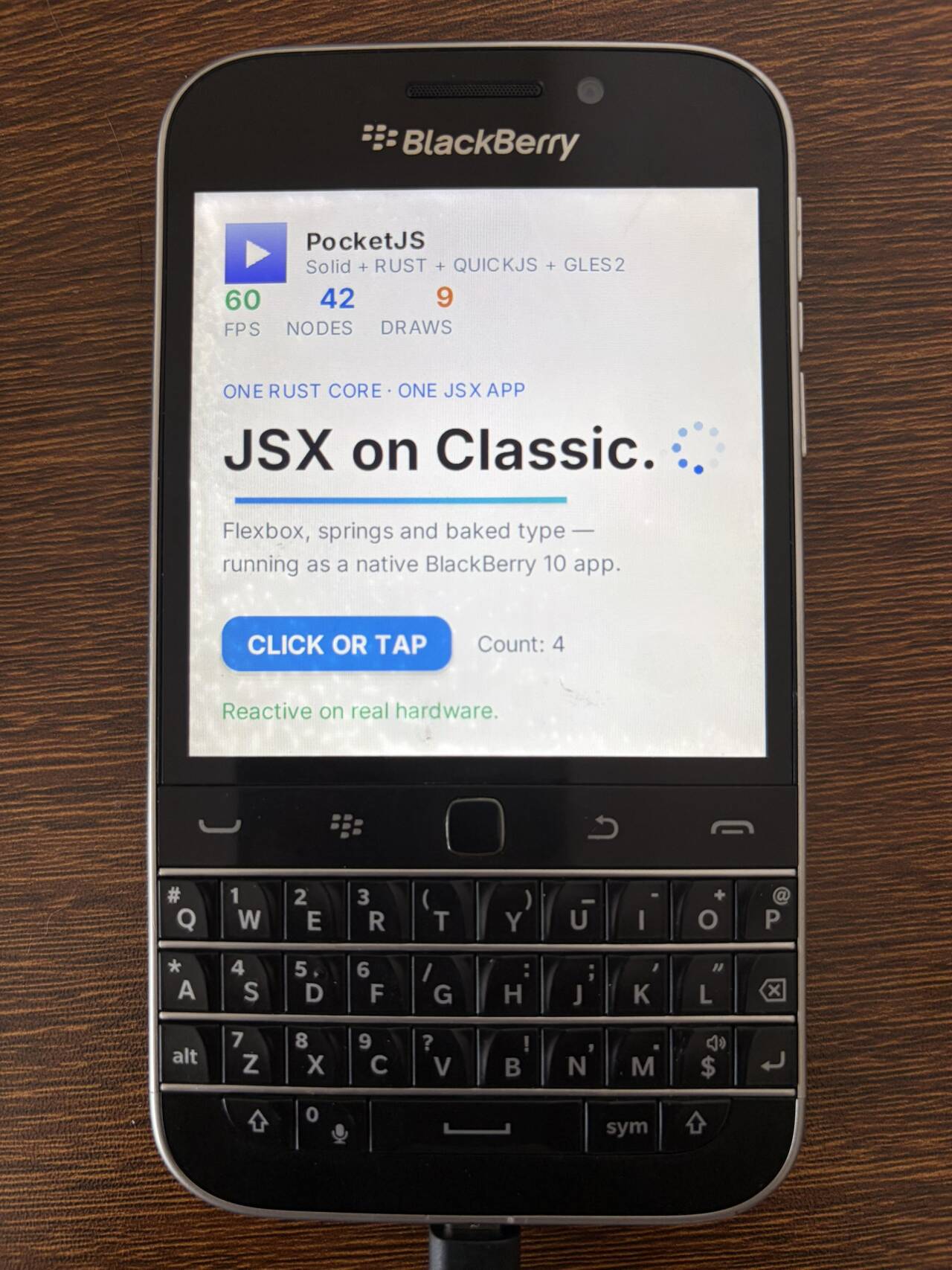
The Hero demo running as a native BlackBerry 10 application on a real Classic — the square 720×720 screen above the tool belt and the physical keyboard.
The BlackBerry Classic is a 2014 phone with a square screen, a physical QWERTY keyboard, an optical trackpad under your thumb, and a microkernel operating system underneath in which even the display server is an ordinary user-space process. It is also, in 2026, a phone you are not allowed to install your own software on: every legal route onto it runs through servers that went dark on January 4, 2022.
We got a freshly written app onto one anyway. If you are new here: PocketJS runs real Solid and Vue components on machines with no browser and no OS UI toolkit, by pairing a no-std Rust core that owns the frame with a QuickJS guest that owns the app. On the Classic that pairing compiles into a BlackBerry 10 Core Native process which asks libscreen for a window, gets an OpenGL ES 2 context through EGL, and drives every frame from a BPS event loop, against one private device profile: 720×720 physical pixels, 360×360 logical, raster density 2, a fixed 60 Hz simulation clock, input.buttons + input.touch + text.glyphs.baked.
The native QNX host is now the sole PocketJS host for the Classic. We removed the earlier Android compatibility host, its APK build path, and its private target. The port described here uses bun blackberry-qnx to build a BAR for a rooted device.
Everything above the QuickJS bridge (engine/quickjs-c/pocket_runtime.c, also linked by the iPhone 2G/4S and Meizu M8 hosts) is the same code every other PocketJS target runs. Everything the Classic cost us is below it, and almost none of that cost was graphics. It was getting in: a phone that carried security to the point where, in 2026, native development is nearly impossible; a community root project that pushed that door back open; the "everything is the network" way a BlackBerry talks to a computer; and a genuinely archaeological pair of protocols — management and updates over HTTPS + CGI + XML/form-data, file management over SMB/CIFS — so you can mount the phone's filesystem on your computer and manage it like local files.
The machine
The BlackBerry Classic (model SQC100, codename Q20) shipped in December 2014 as BlackBerry looking back in the all-touch era: it put the familiar physical shape from around 2011 back on. A full physical QWERTY keyboard, a navigation strip above it called the tool belt (Menu / Back / Send / End, with an optical trackpad in the middle), and a square screen.
- Screen: 3.5 inches, 720×720, about 294 ppi. The square screen is a BlackBerry keyboard-phone tradition — the display gives way to the keyboard, so its width equals its height. For us, square means the logical viewport is a square 360×360, scaled at raster density 2 to 720×720.
- SoC: Qualcomm Snapdragon S4 Plus MSM8960, dual-core 1.5 GHz Krait, Adreno 225 GPU.
- Memory / storage: 2 GB RAM, 16 GB storage, microSD slot.
- OS: BlackBerry 10.3, built on QNX; the unit we verified runs 10.3.3.3216, the last generation of BB10 firmware.
In the family of PocketJS targets the Classic is not weak — it has far more compute than the PSP or the Symbian E7. What makes it hard was never performance. It is what you are allowed to do to get code onto it.
One guest, one thin host
Before the archaeology, the whole shape of the port in one picture.
The QNX host: hosts/blackberry-classic-qnx |
|
|---|---|
| Process | BlackBerry 10 Core Native ELF: libscreen window, EGL, OpenGL ES 2, BPS event loop |
| Package | unsigned development BAR (blackberry-nativepackager -devMode) |
| Install prerequisite | a rooted Classic: a stock device accepts an unsigned BAR only with a debug token, and the token-issuing service is gone |
| Input source | libscreen keyboard, multi-touch, SCREEN_EVENT_JOYSTICK trackpad events; navigator system keys |
| Toolchain | a digest-pinned BBNDK Docker image (compile, package, deploy) |
| Device status | verified on real hardware: an SQC100-4 at 10.3.3.3216 |
apps/blackberry-classic-demo is the Hero wrapper this host builds, and the profile module (tools/blackberry-classic-profile.ts) registers the target blackberry-qnx-dev: host ABI 9, takeover form, one 720×720 display at raster density 2, and exactly three capabilities. That target id is compiled into the guest bundle and into the native host, and checked when the guest mounts, so a bundle built for any other machine refuses to start rather than half-running.
The Rust package is pocketjs-ui-cabi under engine/ui-cabi: the no-std C-ABI build of pocketjs-core plus the GLES2 DrawList backend the Nokia E7, iPhone 2G/4S, and Meizu M8 hosts all link. Its compatibility archive is still libpocketjs_symbian_core.a. The Classic builds it with the bare-platform feature against a hand-written target spec (hosts/blackberry-classic-qnx/armv7-qnx-eabi.json: ARMv7 + VFPv3 + NEON, soft-float ABI, PIC, build-std). Note the spec says "os": "none" — the core asks the operating system for nothing at all, so as far as Rust is concerned it is a bare-metal build that happens to get linked into a QNX process.
In other words, the code this port actually adds is very thin: one 547-line main.c, the shared input state machine it feeds (pocket_input.c, 115 lines, already unit-tested before BlackBerry existed as a target), a 33-line BAR descriptor, a 24-line target spec, and a deploy tool that has to go find the phone on the network. The core, the renderer, the fonts, the reactivity: not a byte of it changed for BlackBerry.
The guest side is thinner still: an ordinary Solid component that knows nothing about what is underneath it.
import Hero from "../hero/app.tsx";
import { reportAppAction } from "@pocketjs/framework/host";

// Nothing in here is allowed to know that QNX, libscreen or EGL exist.
export default function BlackBerryClassicHero() {
  return (
    <Hero
      headline="JSX on Classic."
      deviceLabel="running on a BlackBerry Classic."
      actionLabel="CLICK OR TAP"
      runtimeLabel="RUST + QUICKJS + GLES2"
      presentationHz={60}
      spinnerFrameStep={6}
      onAction={(count) => reportAppAction("hero_press", count)}
    />
  );
}
That reportAppAction("hero_press", …) writes each press into a line of status inside the device sandbox: from a tap in TSX, through an entire native stack, to a record on the phone. Not one line of it is Classic-specific.
A phone that carved distrust into every layer
BlackBerry's seriousness about security is the kind that stops a developer who just wants to run a demo dead in their tracks.
On BB10, a native .bar application has only two legal ways onto a stock device:
- Release: sign the BAR with keys issued by BlackBerry's signing authority (RDK/PBDT, later the BlackBerry ID token). Signing is online — you trade for it against BlackBerry's servers.
- Development: put the device in Development Mode and install a debug token — a credential signed by BlackBerry's servers, bound to the device PIN and valid for 30 days. Only then will the device run an unsigned
-devModeBAR. When the token expires, unsigned apps stop running and you have to go ask the servers for a new one.
The design was coherent for its time: even a developer's local debugging needs a time-limited, device-bound, officially blessed pass, and malware has almost nowhere to stand. But it has one fatal premise for its era — BlackBerry's online services have to be alive.
They are not. BlackBerry gave notice back in September 2020: after January 4, 2022, the whole set of legacy services for BB7-and-earlier, BB10, and PlayBook OS 2.1-and-earlier would shut down. That did not just cut off data, calls, and texts — the signing authority, debug-token issuance, BlackBerry ID, BlackBerry Link, and BlackBerry Blend all went with it.
So in 2026 a stock Classic is caught in a deadlock: to install an unsigned development BAR you need a debug token, and the server that issues tokens went dark four years ago. Release signing is the same — that path leads to a server that no longer exists. Through official channels, you cannot install a single application you wrote onto a stock BlackBerry 10 device.
The project that reopened the door
Then, not long ago, someone pushed the door back open.
https://bb10.root.sx is a project called "BlackBerry 10 root and more", credited to Oleksandr (handle bb10root), with guizmox and sw7ft among those who contributed and supported it. It uses known vulnerabilities in BB10 to get root on the device and — the part that matters most to us — bypasses the BAR signature check so unsigned .bar files install directly (one of its routes exploits the install_apk command path skipping the bar signature check, plus packages with certain prefixes skipping verification). It has publicly verified 10.3.3.3216 — the firmware on the unit in our hands.
Our host reaches the device exactly this way. blackberry-nativepackager -devMode produces an unsigned BAR, blackberry-deploy pushes it to a rooted Classic, installs it, and launches it. No debug token, no signing authority, not a single living BlackBerry server anywhere in the loop.
The people who do this kind of work usually get nothing back for it. They reverse-engineer a platform its own maker has sentenced to death, to serve a small group of people still tinkering with these old machines. And yet it is exactly that work that lets a square-screened 2014 phone run freshly written code in 2026.
A salute to the developers who put this work in. Without bb10.root.sx this post would not exist at all. It would be stuck forever at "the build passes, but it installs on no real device."
Everything is the network: how the phone talks to a computer
Plug the Classic into USB expecting a storage disk, and what shows up on the computer instead is a network adapter.
This is BlackBerry 10's default way of talking to a computer: the device's USB function enumerates as a CDC-NCM Ethernet adapter (USB vendor 0x0fca — Research In Motion). In Development Mode the device puts itself at the link-local address 169.254.0.1 and the computer takes 169.254.0.2. Everything after that — device info, installing apps, backup, OS updates, debugging — all runs over that USB-Ethernet link, over HTTP/HTTPS. ("Connect to Windows" mode switches the adapter to RNDIS so Windows' native driver can take over; the standard/Mac mode is CDC-NCM/ECM.)
Our deploy tool follows exactly that path. On Linux, tools/blackberry-qnx.ts first uses udevadm to find the adapter whose vendor is 0fca and whose driver is cdc_ncm, confirms it carries a 169.254.x link-local route, and only then pushes the BAR; if the route is missing it simply prints sudo ip address replace 169.254.0.2/16 dev … for you to add. The blackberry-deploy that does the real work runs inside the BBNDK image with --network host, reaches the device's development service over 169.254.0.1, and -installApp -launchApp installs and launches.
Debugging is the network, too. Turn on Development Mode and the device starts a qconnDoor service listening on TCP 4455 with challenge-response authentication; blackberry-connect / blackberry-deploy all connect to the device IP, and SSH runs on port 22 where only the unprivileged devuser account can log in. That underlying channel is a binary protocol over TCP with an RSA-1024 challenge and an AES-128-CBC session (in the reverse-engineered tooling the permission handshake is literally named QCONNDOOR_PERMISSIONS). No serial cable, no adb — to a computer, a BlackBerry is first of all a host on the network.
BlackBerry Link, and a little protocol archaeology
To manage the files on the device, the official tool is BlackBerry Link. It is nice, but for us in 2026 on an Apple Silicon Mac it is basically a relic:
- Link only ships for Windows and macOS. The macOS build stopped at 1.2.1 (April 2014), requires OS X 10.7+, and is 32-bit Intel. Apple stopped running 32-bit binaries as of macOS Catalina (10.15) — so on today's macOS 26.6 on Apple Silicon it simply will not launch. The Windows build went a little further, to 1.2.3.56 (June 2014), and stopped there.
- Even if you have an old machine that can run Link, its servers are gone. Per BlackBerry's own EOL notice, after January 4, 2022 the "download system is no longer available," and Link/Blend/Desktop Manager/BlackBerry World were reduced to "limited functionality." Anything that depends on the official servers — downloads, updates — is dead.
Fortunately the community left reverse-engineered tools behind. The archetype is Sachesi — a cross-platform tool by Sacha Refshauge (GitHub xsacha), GPL-3.0, formerly "Dingleberry," open-sourced in May 2014. It searches, downloads, and extracts firmware; installs and uninstalls .bar; backs up and restores; wipes; reboots; reads device info — and it needs no Development Mode. It is written in Qt and still builds and runs from source today on Apple Silicon with a current Qt — which is how we read its source and saw the protocol clearly.
And once you do see the protocol clearly, something interesting shows up: BlackBerry uses two completely different protocols for "device management" and "file management."
Management and updates: HTTPS + CGI + XML
Device info, installing apps, backup, OS updates — this class of operation runs over an HTTPS + CGI interface: requests go to /cgi-bin/*.cgi on the device, and every response is XML rooted at <RimTabletResponse>. A few of the key endpoints:
discovery.cgi(plaintext HTTP:80): returns<DeviceCharacteristics>— PIN, model,OsType,PlatformVersion,DeveloperModeEnabled, and so on.login.cgi(HTTPS:443): a challenge-response login. The device answers with an<AuthChallenge>(Salt,Challenge, iteration countICount); the client runs iterated SHA-512 (hashingcounter ∥ salt ∥ passwordrepeatedly, folding the challenge in on the last round) and sends the result back.dynamicProperties.cgi:POSTaGet Dynamic Properties=Get Dynamic Propertiesform and get back the list of every application on the device (os/radio/application), the battery level,HardwareID, and more.update.cgi: this is how a.bargets installed. FirstPOSTanapplication/x-www-form-urlencodedmode=bar&size=<bytes>to start the install; the device answers<UpdateStart>; then the client POSTs the raw bytes of the.bardirectly as the body, and the device drives it with a run of<UpdateProgress>(each with a<Status>and a percentage), finishing with<UpdateEnd>.
Laid out, a single .bar install looks like this (endpoints, fields, and XML shapes taken from Sachesi's implementation):
# 1) Start the install: form-encoded, declaring the mode and total size
POST /cgi-bin/update.cgi        Content-Type: application/x-www-form-urlencoded
mode=bar&size=4193095
    → <RimTabletResponse><UpdateStart>…</UpdateStart></RimTabletResponse>

# 2) POST the raw .bar bytes as the body (note: not multipart)
POST /cgi-bin/update.cgi?type=bar   Content-Type: application/octet-stream
<…raw .bar bytes…>

# 3) The device drives progress with a run of XML until it finishes
    → <RimTabletResponse><UpdateProgress><Status>InProgress</Status><Progress>42</Progress></UpdateProgress></RimTabletResponse>
    → <RimTabletResponse><UpdateProgress><Status>InProgress</Status><Progress>88</Progress></UpdateProgress></RimTabletResponse>
    → <RimTabletResponse><UpdateEnd><Status>Success</Status></UpdateEnd></RimTabletResponse>
(One small correction so "form-data" doesn't mislead you: the kickoff request is form-encoded, but the actual body is a raw octet-stream, not multipart. The skeleton of "HTTPS + CGI + XML responses + a form kickoff" is right.) These tools also spoof their User-Agent as QNXWebClient/1.0 and deliberately ignore TLS certificate errors — because the device uses a self-signed certificate. The login step (login.cgi) is a challenge-response: the device returns an <AuthChallenge> carrying a Salt and iteration count, and the client hashes counter ∥ salt ∥ password with iterated SHA-512, folds the challenge in on the last round, and sends the result back.
File management: SMB/CIFS, mountable directly
For "manage the files on the device," BlackBerry switches to a completely different protocol: SMB/CIFS. The device runs an SMB service (it identifies as Samba 3.0.x — and note, it runs on QNX, not Linux; people who sniffed the traffic years ago saw Samba and assumed Linux, which is wrong) listening on ports 139/445, exporting a few shares:
media: internal user storage;removeable_sdcard(yes, the device misspells "removable"): present only when an SD card is inserted;certs: certificates.
The username is set on the device under Settings → Storage and Access → "Identification on Network", and the password is the "Wi-Fi storage password" there. It works over both USB and Wi-Fi.
Which means something genuinely nice: you can mount the BlackBerry's filesystem straight onto your computer and manage it like local files. On macOS, smb://169.254.0.1/media in Finder connects; on Linux:
sudo mount -t cifs //169.254.0.1/media /mnt/bb \
  -o user=<network-identification-user>,password=<wifi-storage-password>,vers=1.0,sec=ntlm
(Because the other end is SMB1-era Samba 3.0.37 and modern kernels disable SMB1 by default, you have to add vers=1.0 explicitly.) A 2014 phone, and its filesystem is just a drive on your desktop.
MSC, and the MTP that was never chosen
BlackBerry also supports USB Mass Storage (MSC), but sparingly: it exposes only the external SD card as an MSC block device, never the internal storage.
And there is a knock-on limit: once the SD card is enumerated as MSC, the SMB file management above can no longer mount that card. The reason is not BlackBerry but MSC itself — MSC is fundamentally a "dumb" block-device protocol (Bulk-Only Transport + SCSI commands) that hands the computer exclusive block-level ownership of the whole device. The filesystem layer can have only one owner: either the computer has it mounted or the phone does, never both. So the moment MSC is on, the card has to be unmounted on the phone side, and the phone's apps — and the SMB path — can no longer see it.
The period comparison is the interesting part. On most Android devices of that era, MTP was already the norm — and MTP works at the file-object layer, not the block layer, so a phone can expose files to the computer while it keeps reading and writing the same storage itself, and it can expose internal storage without switching to a block device. BlackBerry had a more modern option available and did not pick MTP, going instead with "SMB for internal storage + MSC for the SD card only." Why exactly, I could not find an official statement; but the result is that to fully manage this device's files you go over the network with SMB, not by plugging in USB as a thumb drive.
QNX's graphics, and a different design philosophy
To understand why this phone is "everything is the network, everything is a service," you have to start with the QNX underneath it.
QNX is a microkernel real-time operating system, built in 1980 by Quantum Software Systems (Dan Dodge and Gordon Bell) in Kanata, Canada (first commercial release in 1982, renamed QNX in 1984). It goes the opposite way from the monolithic kernels you know, Linux/XNU: the kernel itself (procnto) is tiny, doing only a few things — CPU scheduling, synchronous message passing (MsgSend/MsgReceive/MsgReply), interrupt redirection, timers. The filesystem, the network stack, device drivers, and even the graphics are all ordinary user-space processes.
This has two consequences. First, isolation: when a driver crashes, only a user-space process crashed — it can be restarted, the kernel is untouched. This is exactly why QNX runs in cars, medical devices, industrial control, and routers — places that "can't die" (over 275 million vehicles run QNX today; it is exactly what RIM wanted — Harman bought QNX in 2004, RIM bought it from Harman in April 2010 — which is how there came to be a PlayBook and BB10). Second, everything is a message: opening a device, reading a file, asking for a display buffer — underneath, all of it is sending a message to some user-space service process. QNX registers those services as pathnames in one unified namespace (a resource manager), so it is very "Unix" at heart, but implemented as client-server message round-trips:
// Client: send a message, then block until the server replies. That is almost
// the whole of QNX IPC.
MsgSend(server_conn, &request, sizeof request, &reply, sizeof reply);

// Server (in another process): receive, do the work, reply.
int rcvid = MsgReceive(channel, &request, sizeof request, NULL);
/* …do the work… (open/read/write on a device is exactly this round-trip) */
MsgReply(rcvid, EOK, &reply, sizeof reply);
The open()/read() you write in POSIX get translated by the C library into a MsgSend like this, sent to the user-space service that registered the matching pathname. The kernel's only job is to move the message from one process to another — even the filesystem and the network card live outside it.
Graphics is the same model. BB10's windowing and composition is handled by the Screen graphics subsystem (libscreen) — screen is itself a user-space service (it exposes pathnames under /dev/screen, exactly the resource-manager pattern) that owns the displays, the display pipelines, and composition. Applications are its clients:
- An app creates a
screen_context_t, ascreen_window_t, allocates buffers (screen_create_window_buffers), and then either draws into them with the CPU and callsscreen_post_window, or binds the buffers to EGL and draws with OpenGL ES — our QNX host takes the latter:libscreenwindow + EGL + GLES2. - What actually stacks all the windows into the final image is the
screencompositor service, using hardware display layers/overlays where it can and falling back to GPU composition when it can't. (One detail that happens to apply to us: in the official docs, when the whole screen has only one fullscreen application, Screen bypasses composition entirely — and our host is exactly one fullscreen takeover application.) - And a very BB10 concept: window groups (
screen_create_window_group/screen_join_window_group). One process can embed another process's window inside its own. Video, Cascades child windows, and even the entire Android runtime's window are composited into the picture this way — the system shell (the navigator process) owns top-level composition, and applications "join" its group.
Our host takes the most direct path in there: ask screen for a window, bind its buffer to EGL, and then draw purely with GLES2. Condensed, the bring-up looks like this:
/* 1) Ask the screen service for a context; EGL gets a GLES2 context */
screen_create_context(&screen_ctx, SCREEN_APPLICATION_CONTEXT);
egl_display = eglGetDisplay(EGL_DEFAULT_DISPLAY);
eglInitialize(egl_display, NULL, NULL);
eglBindAPI(EGL_OPENGL_ES_API);
eglChooseConfig(egl_display, config_attrs, &config, 1, &n);
egl_context = eglCreateContext(egl_display, config, EGL_NO_CONTEXT,
    (EGLint[]){ EGL_CONTEXT_CLIENT_VERSION, 2, EGL_NONE });

/* 2) Create the window, open our own window group, configure it as one
      720×720 double-buffered GLES2 target */
screen_create_window(&screen_win, screen_ctx);
screen_create_window_group(screen_win, group_name);
screen_set_window_property_iv(screen_win, SCREEN_PROPERTY_FORMAT, &format);
screen_set_window_property_iv(screen_win, SCREEN_PROPERTY_USAGE,  &(int){ SCREEN_USAGE_OPENGL_ES2 });
screen_set_window_property_iv(screen_win, SCREEN_PROPERTY_BUFFER_SIZE, (int[]){ 720, 720 });
screen_create_window_buffers(screen_win, 2);

/* 3) Bind that window buffer as an EGL surface; from here it's just GLES2 */
egl_surface = eglCreateWindowSurface(egl_display, config, screen_win, NULL);
eglMakeCurrent(egl_display, egl_surface, egl_surface, egl_context);
eglSwapInterval(egl_display, 1);   /* follow vsync */
Notice the "window" is, all the way through, a buffer you asked a service for — not a slab of video memory the kernel handed you. That is exactly what the resource-manager model looks like when applied to graphics.
In this architecture, events arrive through BPS (BlackBerry Platform Services): a C library that folds screen, navigator, sensors, and the rest into a single event queue. Our host uses it in the plainest possible way — bps_initialize(), register for screen and navigator events, then loop on bps_get_event. Window activate/deactivate, orientation, exit, and system keys all arrive as events from the navigator shell process. (System state lives in a separate mechanism, PPS — a pile of readable/writable "objects" under /pps, where writing publishes and reading subscribes.)
Our main loop is plain, too — drain everything currently queued, then run exactly one frame:
while (!app_shutdown) {
  int timeout = app_active ? 0 : -1;   /* foreground: take without blocking; background: block for a wake */
  bps_get_event(&event, timeout);
  handle_event(event);                 /* screen (touch/keys/trackpad) + navigator (lifecycle/system keys) */

  if (app_active) {
    do {                               /* drain everything still queued this instant… */
      bps_get_event(&event, 0);
      handle_event(event);
    } while (event != NULL);
    render_frame();                    /* …then advance exactly one 60 Hz tick, then eglSwapBuffers */
  }
}
This design philosophy is quite unlike the other mobile systems of the era:
- iOS / Android are built on monolithic kernels (XNU / Linux), the display driver lives in the kernel, the app's main thread drives UIKit / the view system directly, and a system compositor (iOS's render server, Android's SurfaceFlinger) puts it all on screen.
- QNX / BB10 breaks all of that into message round-trips between user-space services; graphics is "just another service," and cross-process window-group composition is a first-class citizen. It carries the isolation-and-determinism genes it built up in cars and medical devices straight into a phone.
- Even BB10's own native UI framework, Cascades (from TAT, the Swedish design house RIM acquired, built on Qt/QML), follows the same bent: it draws on a separate rendering thread, over a retained scene graph, so a busy app thread never stalls the animation. Together with bezel gestures, Peek/Flow, and Active Frames, BB10's interaction itself grows out of "the shell owns the edges, rendering owns its own thread."
What is striking is how naturally PocketJS lands on this structure. Our core is already one pure frame function that must return quickly, with the host owning the event pump — the same shape QNX wants ("drain the events, run a frame, return"), as naturally as it did on Symbian's active object. QNX wants to be asked politely, and PocketJS's host only knows how to ask politely.
The key in the middle: from wheel to trackpad
BlackBerry's identity is bound, in large part, to the navigation key under your thumb. Its lineage is worth a moment:
- Side track wheel: the earliest BlackBerrys (the 850 in 1999 through the 8700 series around 2005) put a wheel on the side of the body — thumb-scroll, press to confirm. Every navigation key BlackBerry shipped afterwards is a descendant of it.
- Trackball: the Pearl 8100 in 2006 moved a small rolling ball to the front, four-way plus press; the Curve 8300 and Bold 9000 used it. Nice, but prone to dirt and wear.
- Optical trackpad: from the Curve 8520 in 2009, an optical sensor replaced the trackball — like a tiny optical mouse, no moving parts, sensing the finger's relative motion directly; the Bold 9700 and 9900 carried it on.
- On BB10's all-touch phones (Z10, Q10, Passport…) the key was removed entirely.
- Then the Classic (Q20, December 2014): it deliberately put the tool belt back — Menu / Back / Send / End, with an optical trackpad in the middle, a nod to the Bold 9900 era. BB10.3.1 added trackpad support to a system that was never designed for one: there is no global cursor (only the browser and Maps get a pointer); everywhere else, a blue focus highlight moves cell by cell through the Cascades UI.
For us, this trackpad is an interesting engineering problem, because it is a relative pointing device: it gives you displacement deltas, not coordinates, and certainly not discrete "up/down/left/right." Our guest, meanwhile, lives in a d-pad / button world (input.buttons). So the host has to turn relative motion into discrete focus movement.
In libscreen the trackpad arrives as SCREEN_EVENT_JOYSTICK events carrying SCREEN_PROPERTY_DISPLACEMENT and a button mask. The displacement is an integer and every event is one "notch," so the host initialises the threshold at 1: every non-zero event is one d-pad pulse in its direction, and a click (buttons != 0) becomes CIRCLE. Those deltas go into the same few lines every relative input in PocketJS goes through, in the Classic host input state machine (hosts/blackberry-classic/pocket_input.c):
/* Relative motion → one d-pad pulse per threshold crossing; the axis resets
   after a pulse, so the remainder of a big move can never flip the next one.
   On the Classic the threshold is 1: one displacement notch, one pulse. */
void pocket_input_relative(PocketInputState *state, float delta_x, float delta_y)
{
  const float threshold = state->relative_threshold;
  state->relative_x += delta_x;
  state->relative_y += delta_y;
  if (state->relative_x <= -threshold)      { state->pressed |= POCKET_BTN_LEFT;  state->relative_x = 0.0f; }
  else if (state->relative_x >= threshold)  { state->pressed |= POCKET_BTN_RIGHT; state->relative_x = 0.0f; }
  if (state->relative_y <= -threshold)      { state->pressed |= POCKET_BTN_UP;    state->relative_y = 0.0f; }
  else if (state->relative_y >= threshold)  { state->pressed |= POCKET_BTN_DOWN;  state->relative_y = 0.0f; }
}
(The POCKET_BTN_* bits are not typed by hand: pocket_spec.h is generated from contracts/spec/spec.ts, the same table the Rust core and the JS runtime are generated from, and the contract test refuses to let it drift.)
This echoes a long-standing PocketJS attitude toward input. The earlier C/cartridge experiment has a hardware-neutral incremental-input contract — RelativeAxis / onAxisDelta (input.ts) — a device-agnostic ABI for incremental controls like a Playdate crank or a rotary encoder. In that worldview the trackpad is "just another relative axis." The Hero demo only needs buttons, so we collapse the axis down to d-pad pulses rather than exposing RelativeAxis to the guest; but the bloodline is the same: never let a device concept cross the boundary into the guest.
So the side wheel of 1999 and the optical trackpad of 2014 are, in PocketJS's eyes, the same thing — a relative motion sensor hiding under your thumb — exactly the way it sees a Playdate crank.
Input: collapsing a keyboard, a trackpad and a touchscreen into one contract
QNX's SCREEN_EVENT_* events and the navigator's system keys are not allowed across the QuickJS bridge. The guest sees only one portable button mask and one touch snapshot, and the host does the whole translation:
| Physical input | Portable input |
|---|---|
| trackpad movement | discrete d-pad focus pulses, one per threshold crossing of the accumulated SCREEN_PROPERTY_DISPLACEMENT; it arrives as integer notches, so the threshold is 1 |
| trackpad click | the press button (CIRCLE), held while the button is down, tracked apart from the keys |
| Enter/Return, d-pad center | the press button |
| arrow keys | d-pad; a key down is one press edge, auto-repeat does not press again |
| Space | START |
| Menu | TRIANGLE |
| Send (a navigator system key) | a one-shot press edge; End and Back stay with the system |
| touchscreen | one tracked contact (a second finger never becomes input), divided into 360×360 logical coordinates, with the host-resolved bounds hit fact |
All of it lands in pocket_input.c, a small state machine the BPS callbacks feed and the frame loop samples exactly once per guest turn. It is plain C with no platform headers, so it is unit-tested with the host compiler — key edges, trackpad pulses, the click, and the touch latch all have a scenario in tests/fixtures/pocket-input-test.c.
For this host, pocket_runtime.c grew one new entry point: pocket_runtime_tick, exactly one guest turn followed by one core tick, taking the button mask, the sampled contact, and its hit fact. (The older pocket_runtime_frame* calls stay for the original iPhone host, whose 30 Hz presentation advances two core ticks per guest turn.)
One frame's worth of input is fed in like this — sample the state machine into "a button mask + a touch snapshot," run one tick, then let the GPU draw:
static int render_frame(void) {
  PocketInputSample sample;
  PocketRuntimeInput frame;
  pocket_input_sample(&input, &sample);                       // held + one-frame edges; latch consumed here

  frame.buttons    = sample.buttons;
  frame.touch_down = sample.touch_down;
  frame.touch_x    = (int)(sample.touch_x * POCKET_LOGICAL_WIDTH  / surface_width);   // 720 → 360 logical
  frame.touch_y    = (int)(sample.touch_y * POCKET_LOGICAL_HEIGHT / surface_height);
  frame.touch_hit  = sample.touch_down ? pocket_runtime_hit_test_bounds(frame.touch_x, frame.touch_y) : 0;

  pocket_runtime_tick(&frame);                                // one guest turn + one core tick
  pocket_runtime_gl_render(surface_width, surface_height);   // GPU draws the retained tree; the CPU touches no pixel
  eglSwapBuffers(egl_display, egl_surface);
  return 1;
}
The press edges and the touch latch inside that state machine are the cure for a trap this port shares with the Meizu M8 one: an event stream and a sampled state are two different things. The trackpad hands you a run of displacement events, but the guest samples only once per 60 Hz; a quick press-and-release can happen entirely between two samples. So the host has to latch an edge like a press until at least one frame has observed it. Touch is the same: a tap's down and up can fall in the same inter-frame gap — and the latch has to fire only on the down, never on the release, or a long press would hand the guest one more "down" frame after the finger had already left. (The first cut of this host did exactly that; a reviewer caught it, and it is now the kind of mistake the unit test refuses.)
The translation seam: the host owns the pump, the guest owns the UI
PocketJS's role on BlackBerry is the same as it was on Windows CE: it does not replace the OS event loop; it sits inside it. bps_get_event is the pump. It drains the screen and navigator events, normalizes them into one frame input, lets the guest take exactly one tick, and presents 720×720 with eglSwapBuffers.
Solid, the app code, and the Rust core never know that screen_window_t, BPS, or SCREEN_EVENT_JOYSTICK exist. And in reverse, the host never learns what "a button" or "a component" means. Each side of the boundary owns half the world: the host owns the pump and the presentation, the guest owns the state and the UI it wants.
This is also why adding a new target costs so little. The M8 turned Windows CE into a whole phone platform; we go the other way, bringing a self-contained modern UI runtime and asking the OS for only the smallest surface that will hold it. From QNX that surface is three things: a window, an event queue, and a GL context.
Why bother
PocketJS's whole bet is that one guest, one core, dropped onto machines of every shape, changes only a thin layer of host. The Classic tests that bet from an unfamiliar direction.
It is not a slow machine. Two 1.5 GHz cores and an Adreno 225 are more than the PSP or the E7 ever had, and the frame loop was never in doubt. What is strange about the Classic is everything around the frame loop. The window is a buffer you ask a user-space service for. The phone shows up on your desk as a host on the network, not as a disk. The keyboard is real, the trackpad reports displacement instead of position, and the screen is a square. Against all of that, the port is one 547-line main.c, and the component sitting above it would run unchanged on a PSP.
And the machine itself is a specimen about trust. BlackBerry carved security into every layer: even a developer's local debugging needs a time-limited, device-bound, officially blessed pass; files go over challenge-response CGI or password-protected SMB; an app is either signed or holds a token. It was impregnable in its day, and the price was this — when the servers behind it went dark, the whole device closed its door to new code. It was the community, not the vendor, that pushed the door back open.
So the last word of this post goes to those people: to bb10.root.sx's Oleksandr, and to guizmox, sw7ft, and everyone who re-rooted a platform its maker had already condemned; to Sachesi's Sacha Refshauge, who reversed the official tools' protocol into a program that still compiles and runs today; to everyone still making firmware, writing tools, and keeping documentation for these square-screened phones. What you did is far heavier than this port — you are the reason a 2014 BlackBerry can still light up a freshly written frame in 2026.
Respect.
Further reading: QNX's System Architecture on the Neutrino microkernel and its message passing; the Screen Graphics Subsystem developer guide, including composition and window groups; the PPS service; RIM's own GoodCitizen sample for BPS, screen, and the navigator. The BB10 root project lives at bb10.root.sx, and Sachesi is the community tool whose source made the device protocol legible. BlackBerry's End of Life FAQ records the January 4, 2022 shutdown. PocketJS's Classic host is documented in docs/BLACKBERRY_CLASSIC.md.